How to Master Digital Payments in China: A Complete Guide for Retreat & Ski Guests
How to Pay Like a Local in China (Even If You Don’t Speak Chinese or Have a Local Bank)
Welcome to the “Cashless Kingdom.”
China has skipped straight to a digital payment society. From high-end malls to fruit stands, almost everything is paid by QR code—your phone is your wallet.
The good news?
China made it way easier for travelers in 2024: you don’t need a Chinese bank account to pay like a local. This guide will show you how to set up your digital wallet before you arrive, so you can skip payment headaches and enjoy your trip.
Part 1: Payment in China—What’s Changed?
Here’s how most foreigners pay in China, according to the latest People’s Bank of China guide:
- Cash: Good for emergencies or tiny shops, but rarely used.
- Bank Card: Most international cards (Visa/Mastercard) work only at luxury hotels or upscale malls—not in everyday places.
- Mobile Payment: The easiest way—via Alipay or WeChat Pay, now foreigner-friendly.
- e-CNY: China’s digital currency—mainly experimental; you probably won’t need it.
ℹTipping isn’t expected in China, but if you want to tip your tour guide, it’s appreciated and common in tourism.
Where Will My Credit Card Work?
You can still use your physical Visa, Mastercard, or AmEx at:
- Our Resorts & Hotels: Front desks and hotel restaurants generally accept foreign cards.
- High-End Venues: Luxury boutiques in Shanghai/Beijing and major high-speed rail stations.
However, for 90% of your interactions—taxis, local restaurants, convenience stores, and coffee shops—you will need Alipay or WeChat Pay.
Mobile Payment: Your Best Option
In 2024, mobile payment became foreigner-friendly:
A. Use Your Usual Wallet (Apple Pay, Google Pay, PayPal)
- Many Chinese shops now accept foreign wallets via QR scan—especially in big cities and tourist areas.
- No Chinese app download needed. Just scan the store’s code and pay.
- Google Pay works at fewer spots than Apple Pay.
B. Use Alipay or WeChat Pay (Link Your Card)
- Best for longer stays or rural trips.
- You’ll need to set these up (see next section), but they’re almost universally accepted.
Part 2: The Setup Tutorial (Do This Before You Fly)
The two giants of Chinese payments are Alipay and WeChat Pay. We strongly recommend setting up Alipay first, as it currently has the highest success rate and best English interface for international travelers.
A. How to Setup Alipay (Recommended)
Think of Alipay as your digital Swiss Army Knife. It handles payments, ride-hailing (Didi), and food delivery.
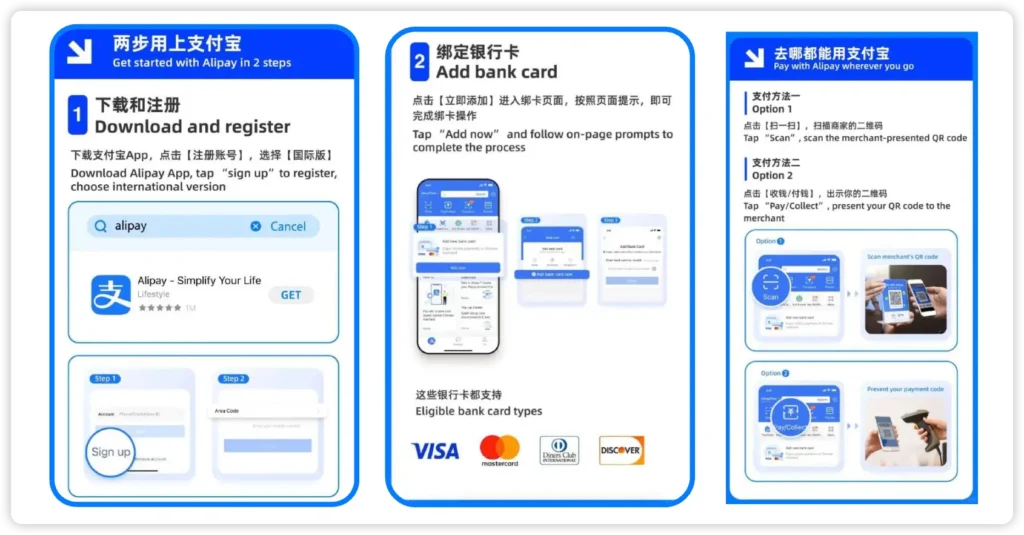
Step 1: Download & Register
- Download the Alipay app (ensure it is the international version, usually just called “Alipay” ).
- Open the app and register using your international mobile number (US, UK, EU, etc.).
- Enter the verification code sent to your SMS.
Step 2: Add Your Bank Card
- Tap on “Account” (bottom right) > “Bank Cards” > “Add Card”.
- Enter your Visa, Mastercard, Diners Club, or Discover card details.
Note: You do not need to pre-load money. The app will charge your credit card directly for each transaction, just like Uber.
Step 3: Identity Verification (Crucial)
- To avoid payment blocks, upload your passport details.
- Go to “Account” > “Settings” (gear icon) > “Account and Security” > “Identity Information”.
- Follow the prompts to scan your passport page.
B. How to Setup WeChat Pay (The Social Wallet)
WeChat is primarily a messaging app (like WhatsApp), but its “Wallet” function is ubiquitous.
Step 0: First-Time WeChat Setup
For travelers, registering a brand-new WeChat account requires a Chinese mobile number to get the verification code. Since most foreigners use a temporary SIM while visiting China—and it’s rarely a mainland China number (or able to receive codes)—you’ll need a helping hand from someone local (like your tour guide, hotel staff, or a local friend, contact us if you need help on WeChat verification):
- How it works: Your friend opens WeChat → “Add Contacts” → “Mobile Contacts” → enters your Chinese phone number → generates a QR code → you scan their code in your WeChat app and send a request → once they approve, you can finish registration with your phone number.
Note: You do not need to pre-load money. The app will charge your credit card directly for each transaction, just like Uber.
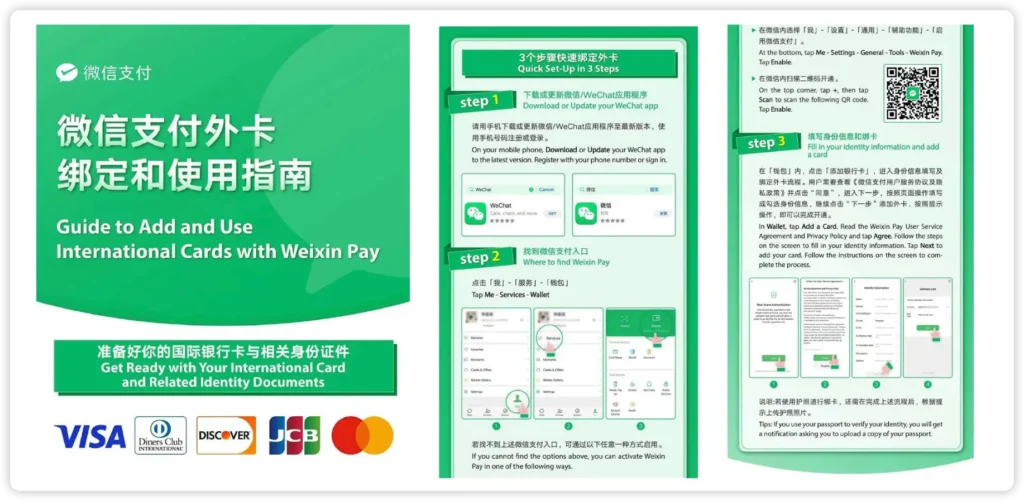
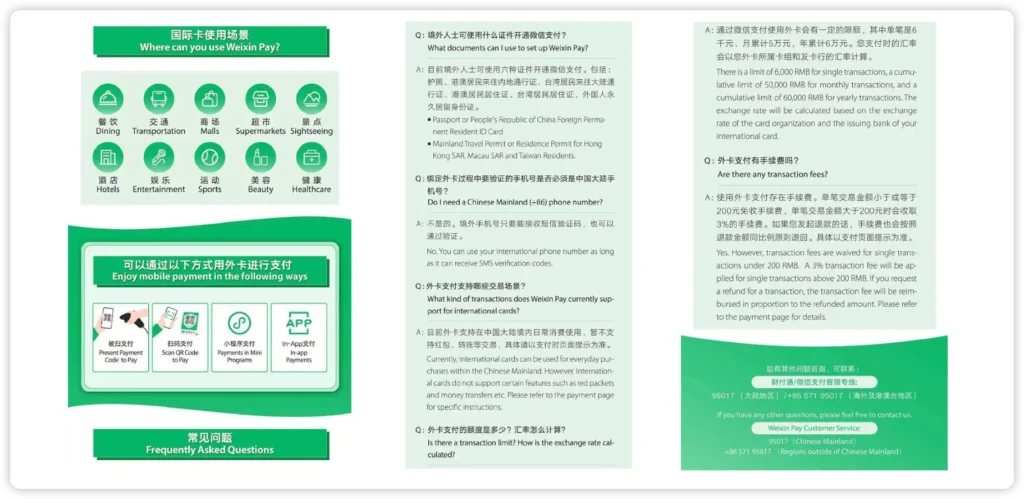
Step 1: Enable the Wallet
- Download WeChat and sign up with your phone number.
- Go to “Me” > “Services” > “Wallet”.
- If you don’t see “Wallet,” try asking a friend who has WeChat to send you a “Red Packet” (a small money transfer), which forces the Wallet to activate.
Step 2: Link Card & Verify
- Select “Cards” > “Add a Card”.
- Input your international card details.
- Important: WeChat security is stricter. You will likely be asked to upload your passport and potentially a photo of yourself holding the passport. Verification can take 12 to 24 hours, so do not leave this until you are at the checkout counter!
Part 3: How to Actually Pay (The Two Methods)
Once you are set up, paying is simple. However, there are two distinct ways to pay, which can be confusing for first-timers.
Method 1: You Scan Them (For small shops/taxis)
- The Scenario: You are at a small noodle shop or a convenience store. There is a printed QR code sticker on the counter.
- The Action:
- Open Alipay/WeChat.
- Tap the “Scan” button at the top left.
- Scan their QR code.
- Type in the amount you owe (e.g., 50 RMB) and confirm.
- Show the “Success” screen to the merchant.
Method 2: They Scan You (For supermarkets/hotels)
- The Scenario: You are at a 7-Eleven, Starbucks, or Uniqlo with a proper register.
- The Action:
- Open Alipay/WeChat.
- Tap “Pay/Collect” (usually next to “Scan”).
- A barcode and QR code will appear on your screen.
- Hold your phone out; the cashier will scan your screen with their scanner equipment.
- The payment happens instantly (no need to type the amount).
| Platform | Best For | Foreign Card Friendly? | Fee Structure |
|---|---|---|---|
| Alipay | EVERYTHING (Shops, Dining, Metro) | ⭐⭐⭐⭐⭐ (Best) | Free under 200 CNY; 3% over. |
| Socializing & Small Vendors | ⭐⭐⭐⭐ (Good) | Same as Alipay. | |
| Didi | Taxis & Private Cars | ⭐⭐⭐⭐⭐ (Global App) | No extra fees if card linked directly. |
| Cash | Emergency Backup / Tips | N/A | N/A (Hard to find change). |
Part 4: Fees, Limits, and Pro-Tips
The 3% Rule
- Transactions under 200 RMB (approx. $28 USD): Fee-Free.
- Transactions over 200 RMB: A 3% transaction fee is applied by Alipay/WeChat (not the merchant).
- Tip: If you are buying a group dinner for 300 RMB, you can ask the merchant if they mind splitting the payment into two transactions of 150 RMB to avoid the fee (though for convenience, many guests just accept the 3% as a travel cost).
| Channel | Fee Source | Fee Rate/Rules | Notes |
|---|---|---|---|
| Apple Pay | Visa/MasterCard | Typically around 3% | |
| Google Pay | Visa/MasterCard | Typically around 3% | |
| Alipay | Alipay | 0% (no service fee) Only cross-border fees charged by Visa/MasterCard. Limits: Free for transactions <200 RMB; over 200 RMB, up to **3%** (usually card fees). Transaction limit: <3,000 RMB per transaction / <50,000 RMB per month / <60,000 RMB per year | |
| WeChat Pay | WeChat Pay | Same as Alipay |
Wise, Revolut, and similar cards:
Paying directly in shops uses the same “card network” fee (~3%).
Transferring to Alipay/WeChat balance (rarely needed) has a ~1% fee.
Part 5: Extra Travel Essentials
Ride-Hailing (Didi)
You cannot hail taxis on the street easily. Use Didi (the Chinese Uber).
- Inside Alipay: You don’t need a separate app. Just tap the “Didi Ride” icon inside the Alipay app home screen. It will automatically use the credit card you linked to Alipay.
- Interface: It is fully in English and allows you to input your destination in English.
Beijing/Shanghai Metro
International visitors can use MasterCard and Visa cards issued overseas to take rides on the city’s entire rail transit network by ‘tap-and-go’, and pay automatically according to the same billing rules as the local residents.
Internet Connection
These apps require an active internet connection to work.
- Do not rely on public Wi-Fi for payments.
- Recommendation: Purchase an eSIM (like Airalo, Holafly, or Nomad) for China before you land. This ensures you have data the moment you step off the plane.
Meituan (The Lifestyle App)
Think of this as Yelp, UberEats, and Groupon combined. You will use this to find top-rated massage spas near the resort or order late-night dumplings to your hotel room. Also, the ride-hailing is available these days.
🥂The Payment Pro:
Meituan lets you link your foreign credit card, and in most cases, paying with an international card (like for food delivery) comes with no extra fees. Major networks like Visa, Mastercard, Discover, and Diners Club are all supported.
2. Trip.com (For Trains & Hotels)
- If you are taking the High-Speed Rail to our ski resort, we recommend using the Trip.com app (the international version of Ctrip).
- It accepts foreign cards seamlessly, gives English support, and you can book train tickets without dealing with the complex official railway app (12306).
Part 6: Troubleshooting & Common Glitches
Even with the best preparation, technology can sometimes hiccup. Here is how to handle the most common issues our guests face:
1. “Transaction Failed” or “Risk Alert”
- The Cause: This is usually your home bank (Chase, HSBC, Barclays, etc.) flagging the transaction as potential fraud because you are suddenly spending money in China.
- The Fix:
- Before you travel: Call your bank to authorize travel to China.
- In the moment: Check your banking app for a “Verify Transaction” notification. Once you approve it there, try the payment again in Alipay/WeChat.
2. “Merchant does not support this payment method”
- The Cause: In China, QR codes come in two types: Merchant Codes (Business) and Personal Codes (Individuals).
- International credit cards usually cannot pay “Personal Codes” due to anti-money laundering regulations. This often happens with small street vendors or taxi drivers using their personal accounts.
- The Fix:
- Ask if they have a different QR code (Alipay is often more flexible here than WeChat).
- Use your emergency cash (small bills).
- Pro-Tip: If you are traveling with a group, having one person who can use “Balance” (money sent to them by a friend or guide) helps, but for most solo travelers, cash is the backup here.
3. “No Internet Connection”
- The Fix: Alipay and WeChat actually have a limited “Offline Mode.”
- If you are scanning their machine (Method 2), the code on your screen refreshes automatically and can often work even if your signal drops for a moment.
- However, do not rely on this. Always carry a portable battery charger (power bank). If your phone dies, your wallet is gone.
FAQ – Answering Your Top Concerns
Embrace the Convenience
It is normal to feel a little apprehensive about relying entirely on your phone for payments. However, once you make that first successful scan—buying a bottle of water or paying for your ski lift pass—you will realize how incredibly efficient the system is.
Apple/Google Pay or foreign wallets. For longer stays, setting up Alipay or WeChat with your card unlocks the full “China experience.”

TravelWishlists – Chelsea