The short answer
China has skipped straight to a digital payment society, and it is lovely once you are inside it. From high-end malls to fruit stands, almost everything gets paid by QR code: your phone is your wallet. This is the “cashless kingdom” people warn you about, and the warning is the only scary part.
The good news? You do not need a Chinese bank account, and you do not need to arrive with a pocket full of notes. Set up Alipay and WeChat Pay on your home phone number before you fly, verify both with your passport, and link one international card to each. That covers almost everything you will pay for. Keep one physical card for hotel bills and large purchases, and carry around ¥300–500 in cash as a backup.
Two numbers decide whether this costs you nothing or a noticeable amount. Any single app payment of ¥200 or less is free. Above ¥200, both apps add about 3% — charged on the full amount, not on the part above ¥200.
Everything else below is about getting the setup right and knowing what to do when something refuses to work.
What to set up before you fly
Do all four of these on your home Wi-Fi, not after you land.
- Download Alipay and WeChat from your usual App Store or Google Play. Inside China the App Store can serve a different storefront and Google Play is unreachable, which turns a five-minute task into an afternoon.
- Verify both apps with your passport. Without this you get the lower spending limits and the higher chance of a declined payment.
- Sort out WeChat before you board. Registering a new WeChat account always needs someone who already uses WeChat to scan your QR code and confirm you. Ask a friend, a colleague or anyone in your group while you still have their attention — do this at home, not standing in the arrivals hall.
- Link one card per app, ideally two different cards from two different issuers. One declined bank should not end your day.
- Test with something cheap. Buy a ¥5 bottle of water at a convenience store and watch the whole flow work before you actually need it.
Getting set up also assumes your phone has data. If you have not sorted that out yet, read internet access in China alongside this page.
The four ways to pay, and which one you actually need
Checked against official Alipay and WeChat Pay documents on 2 October 2026. Rollout details for newer apps change quickly, so confirm availability for your country before relying on one.
| Method | Best for | What it needs | Watch out for |
|---|---|---|---|
| Alipay | The default option. Restaurants, taxis, shops, metro gates, Didi | Home phone number, passport verification | 3% above ¥200 |
| WeChat Pay | Everything Alipay does, plus anything inside WeChat mini-programs | Home phone number, passport verification | Stricter risk controls; sometimes more verification steps |
| TenPayGo | Visitors who do not want to register with a phone number | Email address, eligible overseas card or wallet | New in September 2026, rollout still expanding |
| Nihao China | UnionPay cardholders who want everything in one place | UnionPay or other card top-up | Operated by China UnionPay; check how features are worded before relying on them |
TenPayGo is Tencent’s first app built specifically for visitors, announced in late September 2026. It registers by email rather than phone number, accepts cards from seven international networks plus overseas wallets and Apple Pay, and works at any merchant that already takes WeChat Pay. It also handles the Shenzhen metro and bus code without needing a mainland phone number.
The Nihao China app is run by China UnionPay and bundles payments with transport, translation and tax refunds. Treat claims about its exchange rates as marketing until you see them quoted on your own transaction — the rate itself is UnionPay’s, but your card issuer still has a say.
Neither replaces a working Alipay setup. Keep them as additions, not as your only plan.
What the ¥200 fee rule actually costs you
This is the part most visitors get wrong. The published Alipay rule is clear: payments of ¥200 or less are free, and above ¥200 the charge is 3% of the paid amount. It does not apply only to the excess.
| Typical purchase | Price | Fee in app | Cheaper route |
|---|---|---|---|
| Coffee | ¥38 | Free | App |
| Short taxi ride | ¥45 | Free | App |
| Street food and beer | ¥120 | Free | App |
| Single convenience-store run | ¥200 | Free | App |
| Hotpot dinner for two | ¥268 | ¥8.04 | Split into two payments if the merchant agrees |
| Bathhouse entry | ¥580 | ¥17.40 | Book ahead through a platform with your card |
| High-speed train ticket | ¥550 | ¥16.50 | Book on the platform’s own site with your card |
| One night at a mid-range hotel | ¥650 | ¥19.50 | Pay at the desk with your physical card |
The pattern is obvious once you see it: the app is for daily spending, and the plastic card is for anything that looks like a bill. Paying a hotel folio through the app costs you 3% for no benefit, and you lose the chargeback protection you get from paying a hotel directly.
Splitting a bill to stay under ¥200 works sometimes, and plenty of restaurants will not do it. Do not build a plan that depends on it.
There are two ways to pay nothing at all. An international UnionPay-branded card has been exempt from the 3% inside Alipay and WeChat Pay during a UnionPay promotional period that started in late 2024 and has been extended several times — check the current UnionPay announcement, because the exemption is a promotion rather than a standing rule. First-time WeChat Pay users get 90 days of fee-free payments up to ¥1,000 a day, a window that currently runs to 31 December 2026.
On top of all this sits your own bank’s foreign transaction fee, usually 1–3%. A card with no FX fee saves more than any fee trick inside the apps.
The limits that catch people out
WeChat Pay publishes its numbers, and they depend on whether you completed real-name verification.
| Limit | WeChat Pay, verified | WeChat Pay, not fully verified |
|---|---|---|
| Per transaction | ¥35,000 | ¥3,000 |
| Per day | ¥35,000 | — |
| Per year | ¥350,000 | ¥15,000 |
Separately, since March 2024 the guidance covering all such platforms sets a ceiling of USD 5,000 per transaction and USD 50,000 per year for foreign cards in Chinese payment apps. Those figures have not changed since.
Alipay does not publish comparably tidy numbers for every account type, and older figures that circulate on travel blogs no longer match the app. Do not plan around them: your own limit shows on the confirmation screen before you approve the payment, which is the only number worth planning around.
For almost every trip none of these matter. They bite when you try to pay a hotel deposit, buy jewellery or settle a group tour — exactly the things better paid by card anyway.
Setting up Alipay
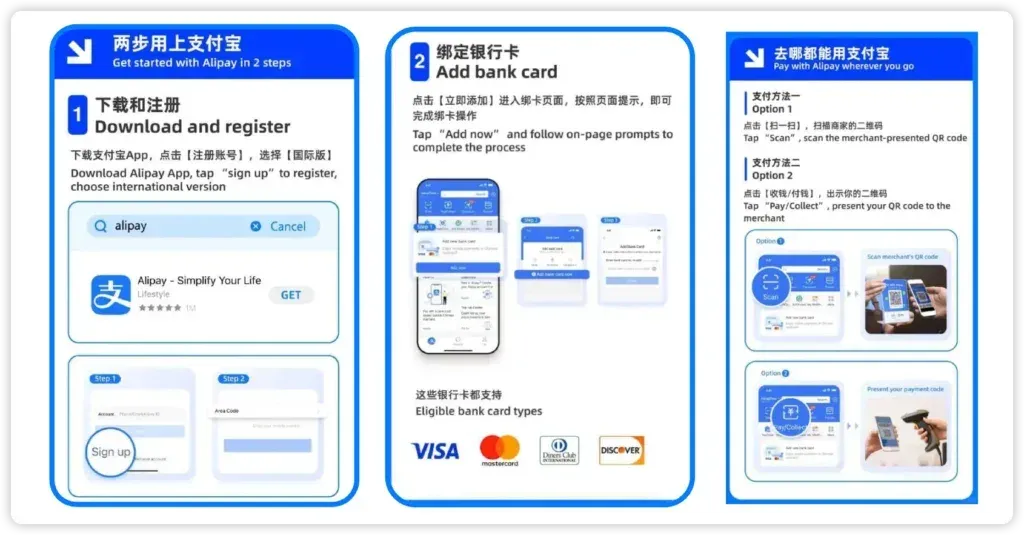
Think of Alipay as your digital Swiss Army knife. It pays for things, obviously, but it also carries your ride-hailing, your food delivery, your train tickets and your metro code, which is why it is the one to set up first.
1. Register. Download Alipay, then sign up with your home country code and mobile number. The SMS code usually arrives in under a minute.
2. Verify your identity. Open Alipay, go to Me → Settings → Identity Verification, choose passport, upload the photo page and take the selfie. This normally clears within a few minutes and unlocks the higher limits.
3. Add your card. Go to Me → Bank Cards → Add Card and enter your Visa, Mastercard, JCB, Diners Club or Discover card. Your bank may push a verification notification.
4. Test it. Pay for something small. The confirmation screen shows both the exchange rate and any fee before you approve.
That is the honest reason to set Alipay up even if you plan to lean on WeChat: it is the one app that will still work when a specific merchant does not cooperate.
Setting up WeChat Pay
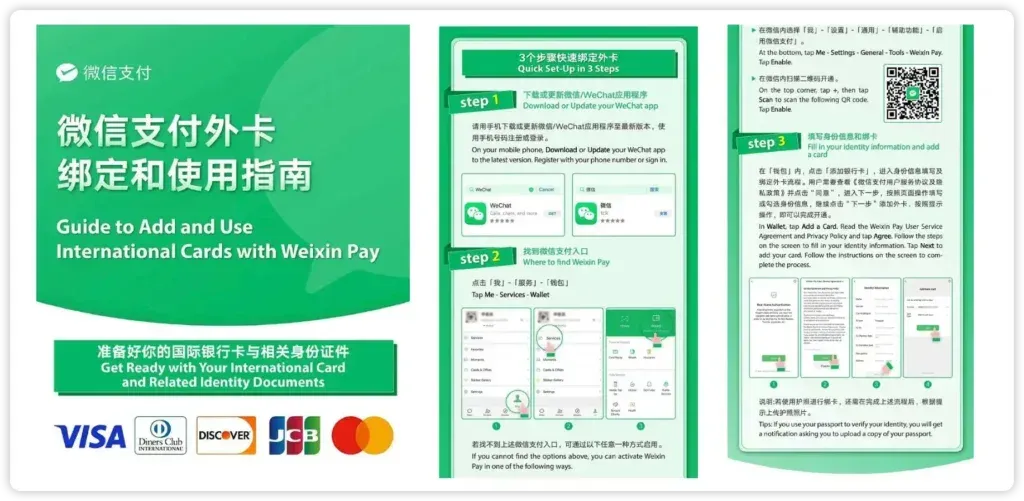
WeChat is worth installing even though it is fussier, because some merchants — especially inside the WeChat mini-program ecosystem — take nothing else.
1. Register. Create your account with your home mobile number. A brand-new account then needs someone who already uses WeChat to scan the QR code it shows you and confirm you — this is not an occasional prompt, it is the standard step, and there is no way around it. Line up that person before you fly: a friend, a colleague, your guide, or whoever is travelling with you. It takes them about ten seconds.
This is also why Tencent built TenPayGo, which registers by email instead and skips the dance entirely. If you have nobody to scan for you, set that one up instead.
2. Go to Wallet. Open Me → Services → Wallet → Cards → Add Card.
3. Verify with your passport. Expect more steps than Alipay here, including a passport scan. Allow time for it — do not leave this until you are standing at a till.
WeChat Pay currently accepts cards from seven international networks: Visa, Mastercard, American Express, JCB, Diners Club, Discover and UnionPay International, as long as the UnionPay card was issued outside mainland China.
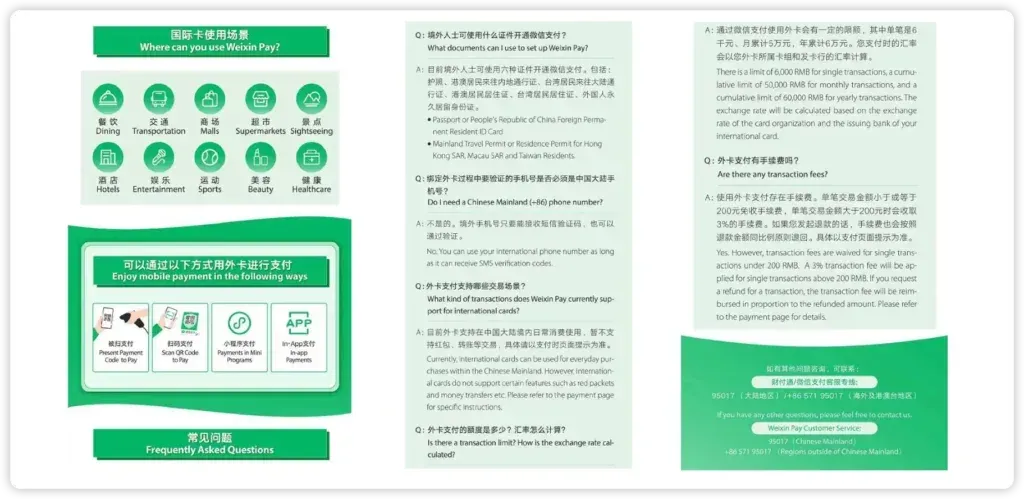
How you actually pay: scan them, or let them scan you
There are two ways to pay, and working out which one is happening is the only genuinely confusing moment. Nobody will explain it to you, because for everyone else it is obvious.
This is the ten-year-old mechanics underneath all of it, and nothing about it has changed. Learn it once and you are done. The habit to build: have your payment code open before you reach the counter. Nobody minds waiting for a card reader, but everyone notices someone fumbling through an app.
What your foreign card cannot do
A foreign card inside these apps is for merchant payments only. Red packets, transfers between people, and topping up or cashing out an in-app balance are all blocked.
That kills one piece of advice that still circulates online — the suggestion that you get a friend to send you a red packet to activate your wallet. That only works with a funded Chinese balance, which is exactly what you do not have.
It also explains a failure that looks arbitrary: some smaller personal QR codes simply will not accept a foreign card, with no error message beyond “not supported.” Cash covers those moments, which is the honest reason to carry some.
When a payment fails
Even with the best preparation, technology has a sense of humour, and it usually picks the moment you are holding up a queue. Almost every failure has one of these causes.
- Your VPN is running. Both platforms treat an anomalous IP as risk. Turn it fully off before paying — including the bundled routing some travel eSIMs include. See China internet access for how to avoid that.
- Your bank flagged it. Notify your bank before you travel, and check your banking app for a verification prompt the moment something fails.
- Card name and passport name do not match. Long names and double surnames trip automatic checks. Use the card in the name closest to your travel document.
- One card is bound to several accounts. This triggers risk controls on both.
- You changed city or device quickly. WeChat in particular reacts to this with a temporary limit.
Carrying a second card from a different issuer solves most of these faster than troubleshooting does.
Deposits, refunds and large purchases
Nobody warns visitors about hotel deposits, and it is the one place people get caught. Hotels commonly pre-authorise a deposit on arrival — enough to cover the room plus incidentals — and release it at checkout. Depending on your bank, the hold can sit on your card for several days to over a week before it disappears.
Two things follow from that. Ask how much the deposit is and when it releases before you hand over a card. And keep advice simple for yourself: pay the deposit with the physical card, not through the app. That ¥650 room charged through Alipay costs you ¥19.50 in fees, and a refund through the app routes back to your card on the platform’s timetable rather than yours.
The same logic applies to train tickets, which are booked ahead anyway, and to anything you might need to dispute. If you want chargeback rights, put it on plastic.
How much cash to bring
Around ¥300–500 in small notes, not the ¥1,000–2,000 that gets recommended in most guides.
Mobile payment covers so much that large cash serves no purpose, and walking around with ¥2,000 creates a worse problem than the one it solves. What you actually need cash for is a phone that died, a rural vendor, or the occasional personal QR code that refuses foreign cards. ¥300 handles all three.
Withdraw from ATMs at major banks — Bank of China, ICBC, China Construction Bank and Agricultural Bank are the reliable ones for foreign cards. Never accept dynamic currency conversion: when a machine asks whether to charge you in your own currency, choose CNY.
Tipping is not expected in China, so do not budget for it and do not feel rude for not doing it. The exceptions are narrow: a private guide or driver on a multi-day arrangement appreciates it, and porters at international hotels understand it.
My take
The thing that actually goes wrong for visitors is not any of the mechanics. It is leaving the setup until they land, then spending the first day trying to register apps on airport Wi-Fi while jetlagged. Everything on this page takes twenty minutes at home and buys you a trip where money is invisible.
It is completely normal to feel uneasy about handing your entire ability to pay to one glowing rectangle in your pocket. Every visitor feels that on day one, and then they buy a bottle of water at a convenience store, watch the little green tick appear, and never think about it again. The gap between anxious and indifferent is one successful scan, usually about five yuan.